- Cricut machines range from $149 to $399, but the real cost is everything you buy after the machine.
- The Cricut Access subscription ($7.99/mo or $13.99/mo) isn't mandatory, but skipping it means paying per design or making your own from scratch.
- For most beginners, the Explore 3 hits the sweet spot. The Maker 3 is overkill unless you're cutting thick materials like balsa wood or leather regularly.
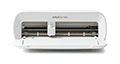
What Cricut Actually Sells (And Why It's Confusing)
Cricut makes electronic cutting machines. You design something on your computer or phone, send it to the machine, and it cuts the design out of vinyl, cardstock, fabric, leather, or dozens of other materials. Think of it as a very precise, computer-controlled X-Acto knife.
The confusion starts when you realize Cricut sells three different machine lines, a monthly subscription, branded materials, tools, and accessories. And the marketing doesn't always make it clear what you actually need versus what they'd like you to buy. So let's break it down honestly.
The Three Machines: Which One Do You Actually Need?
Cricut Joy / Joy Xtra ($149 to $199)
The Joy is Cricut's smallest machine. It handles vinyl decals, iron-on transfers, card making, and labels. The original Joy cuts materials up to 4.5 inches wide, while the Joy Xtra bumps that to 8.5 inches. Both are compact enough to fit on a bookshelf.
Who it's for: Casual crafters who make cards, labels, small vinyl decals, and the occasional iron-on project. If you're decorating water bottles, making custom stickers, or personalizing notebooks, the Joy handles it fine.
Who should skip it: Anyone who wants to cut fabric, thicker materials, or projects wider than 8.5 inches. It doesn't have the power or the cutting width for serious crafting. And you can't use it with the full range of Cricut tools (no scoring wheel, no debossing tip, no rotary blade).
Cricut Explore 3 ($249 to $299)
The Explore 3 is the middle child, and honestly, it's the one most people should buy. It cuts over 100 materials up to 12 inches wide, works with Smart Materials (no mat needed), and handles both cutting and writing/drawing. Cutting speed tops out at 2x faster than the previous Explore Air 2.
Who it's for: Crafters who want to do vinyl projects, paper crafts, iron-on transfers, and basic cardstock work. It's the workhorse for T-shirt makers, Etsy sellers doing vinyl decals, and hobbyists who want room to grow.
Who should skip it: If you know you'll be cutting fabric, leather, balsa wood, or other thick/dense materials regularly, the Explore 3 doesn't have the adaptive tool system the Maker uses. You'll max out on material thickness faster than you'd like.
Cricut Maker 3 ($399)
The Maker 3 is the top-of-the-line machine. It has 10x the cutting force of the Explore 3 (4 kg vs. 400 g), an adaptive tool system that automatically adjusts pressure and blade depth, and compatibility with every Cricut tool including the rotary blade (for fabric), knife blade (for thick materials like chipboard and balsa wood), and debossing/engraving tips.
Who it's for: Quilters, leather workers, people cutting balsa wood or chipboard for models, and anyone running a small business that requires cutting a wide variety of materials. If you're regularly working with fabric and want precise cuts without hand-cutting pattern pieces, the Maker 3 pays for itself in time saved.
Who should skip it: If 90% of your projects are vinyl and paper, you're paying $100 to $150 extra for cutting power you won't use. Be honest with yourself about what you'll actually make.
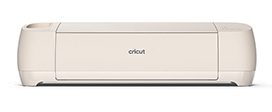
The Hidden Cost: Cricut Access Subscription
Here's where Cricut's business model gets interesting (and a little frustrating). The machines are the entry point, but Cricut really makes its money on the ongoing subscription and materials.
Cricut Access comes in two tiers:
- Standard: $7.99/month (or $95.88/year). Gives you access to over 200,000 images, 700+ fonts, and 10% off purchases in the Cricut shop.
- Premium: $13.99/month (or $119.88/year). Everything in Standard plus licensed designs (Disney, Marvel, etc.), 20% off Cricut.com purchases, and free economy shipping on orders over $50.
Do you need it? Not technically. You can use Cricut Design Space (the required software) completely free. You can upload your own SVG files, use free designs from the internet, or buy individual images from Cricut for $0.99 to $4.99 each. But if you're making projects regularly and don't want to hunt for free SVGs every time, the subscription saves time and frustration.
The 10% shop discount on the Standard plan can offset the subscription cost if you're buying Cricut-brand materials monthly. But that only works if you're buying from Cricut directly, and third-party materials are often cheaper anyway. It's a bit of a circular trap.
Our take: Start without it. Use free SVG sites like SVGCuts, Design Bundles, or Creative Fabrica for a few months. If you find yourself constantly wanting Cricut's library, subscribe then. The Premium tier only makes sense if you're doing licensed character designs or spending more than $60/month on Cricut.com purchases.
Materials: The Cost That Keeps Adding Up
The machine is a one-time purchase. Materials are forever. And Cricut's branded materials aren't cheap.
Here's a realistic look at what you'll spend on common materials:
- Permanent vinyl (Cricut brand): $8.99 for a 12″ x 48″ roll. Third-party options (like Oracle 651 or Oracal from Amazon) run $5 to $7 for the same size.
- Iron-on/HTV (Cricut brand): $9.99 to $12.99 per roll, depending on type. Siser EasyWeed (third-party) costs $6 to $9 per roll and is widely considered better quality.
- Cardstock (Cricut brand): $7.99 for a 12-sheet pack. You can buy a 50-sheet pack of Recollections cardstock at Michaels for around the same price.
- Transfer tape: $6.99 from Cricut, $4 to $5 for generic rolls that work just as well.
- Cutting mats: $8.99 to $12.99 each from Cricut. Third-party replacement mats run $3 to $5 on Amazon.
You'll also need tools: a weeding tool set ($14.99 from Cricut, $7 for off-brand), a scraper/burnishing tool, scissors, and possibly a heat press if you're doing iron-on projects ($30 to $250 depending on quality).
Realistic first-year cost: Machine ($249 to $399) + tools ($30 to $50) + materials ($150 to $400+ depending on how much you craft). You're looking at $430 to $850 before you've finished your first dozen projects. That's not a dealbreaker, but you should know it going in.
Design Space: The Software You're Stuck With
Every Cricut machine requires Cricut Design Space. It's free to download and runs on Windows, Mac, iOS, and Android. And this is where opinions get strong.
What works: It's genuinely easy for beginners. Drag, drop, resize, cut. The learning curve for basic projects is maybe 30 minutes. The mobile app is surprisingly capable for simple cuts. And the image library (free or paid) makes it possible to start crafting without any design skills.
What doesn't: Design Space is cloud-based, which means you need an internet connection to use it (even for designs saved on your computer). The software can be laggy, especially with complex designs. There's no offline mode. And compared to Silhouette Studio or even free tools like Inkscape, the design capabilities are limited. You can't do advanced vector editing, node manipulation, or precise alignment the way you can in competing software.
For most casual users, Design Space is fine. But if you're a graphic designer or someone who wants full control over your cut files, you'll probably design everything in Illustrator or Inkscape, export as SVG, and just use Design Space as a glorified print driver. That workflow is clunky but workable.
What Cricut Gets Right
Beginner-friendliness. No other cutting machine brand has the same onboarding experience. Cricut's tutorials, project ideas, and community resources make it genuinely possible for someone with zero crafting experience to produce a decent project on day one.
Ecosystem. Love it or hate it, the Cricut ecosystem is massive. Materials, tools, blades, mats, presses, and accessories are available at every Michaels, JOANN, Hobby Lobby, Target, and Walmart in the country. You're never stuck waiting for a shipment. If your blade breaks on a Saturday afternoon, you can drive to the nearest craft store and be cutting again in an hour.
Community. The Cricut user community is enormous. Facebook groups, YouTube channels, blogs, and forums mean that almost any problem you encounter has already been solved by someone else. Try finding that level of community support for a Brother ScanNCut.
Smart Materials. The matless cutting option on the Explore 3 and Maker 3 is a genuine time-saver for long cuts and production work. Load the material, press go. No mat alignment, no sticky residue, no warping.
What Cricut Gets Wrong
The subscription pressure. Cricut's entire business model nudges you toward ongoing spending. The Access subscription, branded materials, and proprietary blades all add up. And the 2021 controversy, where Cricut tried to limit free users to 20 uploads per month (they reversed it after massive backlash), showed how willing the company is to monetize its existing user base.
Design Space limitations. The software requires internet access, lacks offline mode, and falls short of competitors in design capability. For a $400 machine, being tethered to a cloud-based app with no offline fallback feels like a significant weakness.
Proprietary accessories. Cricut blades, housings, and some tools use proprietary designs. While third-party alternatives exist for some items, you're more locked into the Cricut ecosystem than you would be with a Silhouette machine.
Mat dependency for most materials. Yes, Smart Materials exist. But the selection is limited compared to mat-based materials, and Smart Materials cost more per unit. Most users still end up using mats for the majority of their projects, which means buying replacement mats regularly ($9 to $13 each, or cheaper third-party options).
Who Should Buy a Cricut (And Who Shouldn't)
Buy a Cricut if:
- You're a beginner crafter who wants the easiest possible entry point into cutting machines
- You value a massive community and readily available supplies at retail stores
- You mainly work with vinyl, iron-on, paper, and cardstock
- You want a reliable machine for a small Etsy shop or side hustle
- You prefer a guided, hand-holding experience over raw flexibility
Skip Cricut if:
- You're an experienced designer who wants full software control (look at Silhouette instead)
- You don't have reliable internet access (Design Space needs it)
- You're on a tight budget and the ongoing materials cost will be a problem
- You hate subscription models on principle (Cricut will keep nudging you)
- You want to cut primarily fabric and nothing else (a dedicated fabric cutter like the AccuQuilt might serve you better)
Where to Buy and What to Watch For
Buy from Cricut.com directly during sales (they run big promotions around Prime Day, Black Friday, and back-to-school season). You can also find deals at Amazon, Michaels, JOANN, and Walmart. Michaels regularly runs 20% to 40% off coupons that work on Cricut machines, which can save you $50 to $100.
Watch out for bundles. Cricut and retailers love selling “everything you need to get started” bundles for $50 to $100 more than the machine alone. Some are decent values (machine + tools + a few material rolls). Many are stuffed with materials you don't need or low-quality accessories you'll replace within a month. Check what's included before paying the premium.
Refurbished machines show up on Cricut's website and on Amazon periodically. A refurbished Explore 3 for $179 or a Maker 3 for $299 is a solid deal if the warranty is included. Just confirm it comes with the power cord, blade, mat, and USB cable.
The bottom line
Cricut makes the most beginner-friendly cutting machines on the market, backed by a massive community and retail availability that no competitor matches. The machines themselves are well-built and reliable. But Cricut's business model relies on keeping you spending: subscriptions, branded materials, proprietary blades, and an ecosystem designed to keep you inside the Cricut world.
If you go in with clear eyes about the ongoing costs and resist the urge to buy everything Cricut-branded, these machines deliver real value. The Explore 3 is the best starting point for most people. The Maker 3 is worth the upgrade only if you know you'll cut thick or specialty materials regularly. And the Joy line is great for casual crafters who want something small and simple.
Buy the machine, budget for materials, skip the subscription until you're sure you need it, and use third-party supplies wherever you can. That's how you get the most out of Cricut without getting played by the ecosystem.